
What Should You Do After You Launch Your Website?
Just launched your website? Learn what to do after launch, from testing forms and improving speed to SEO, security, analytics, maintenance, and redesign.
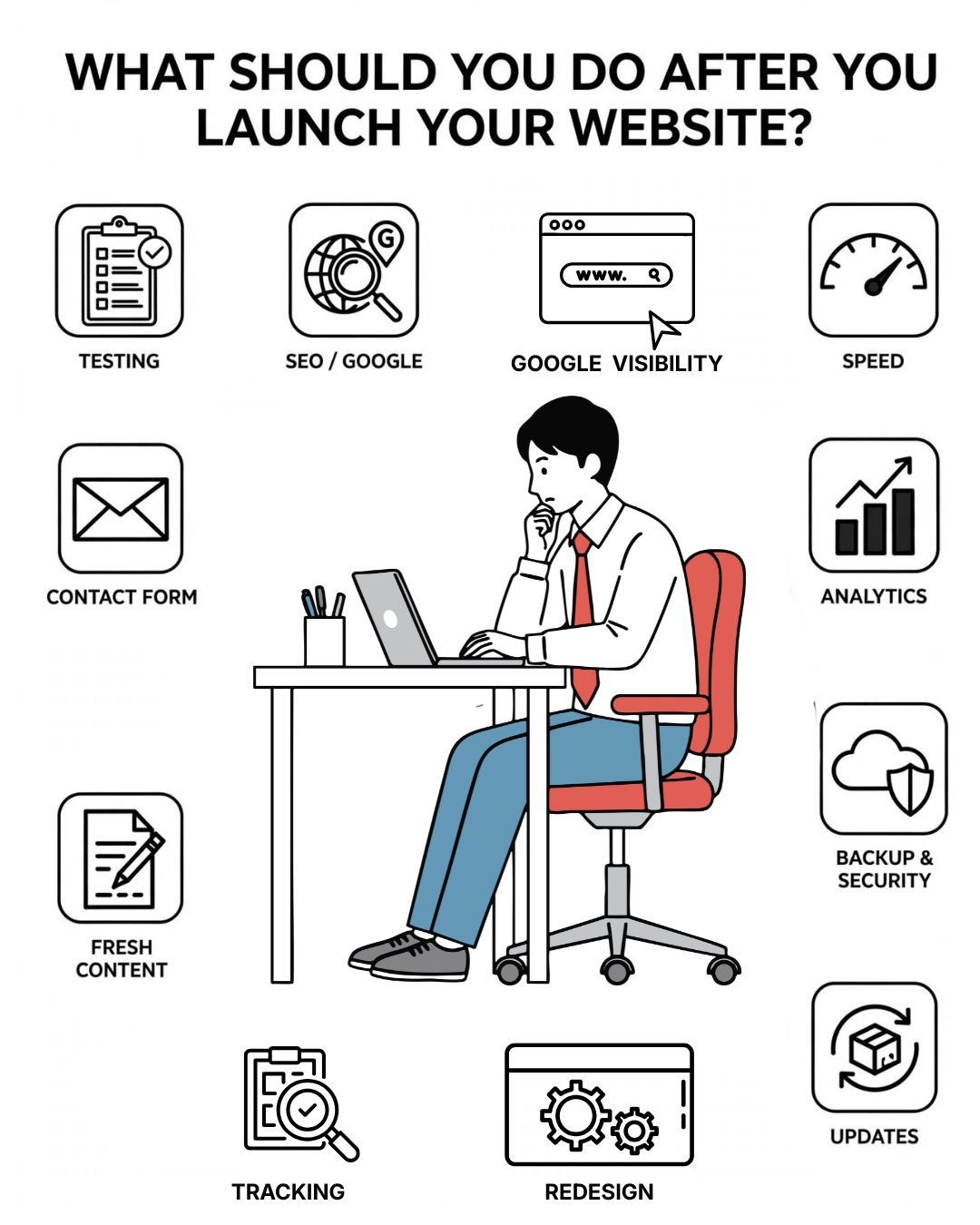
What Should You Do After You Launch Your Website?
After contemplating a lot, changing every minor detail several times, and wondering whether everything is finally ready, here you are.
You have finally launched your much-awaited website.
We have all been there. Designing, redesigning, adding content, changing colors, adjusting layouts, fixing tiny details—and after what feels like an eternity, you finally hit the “Publish” button.
It feels like the job is done.
But here’s the catch: launching your website is just the beginning of the book you are about to write.
Many people overlook the fact that a website is a digital store. Just like a physical store, it is where you showcase your products, promote your services, build trust, and interact with your customers.
Now imagine walking into a physical store and seeing that the place is unkempt. The walls are old and shabby, the products are outdated, and the employee seems uninterested and gives you vague answers about the services.
Would you stay?
Probably not.
You cannot simply open a store and expect customers to keep coming back and buying from you. And the same thing applies to your website.
Your website is often one of the first impressions customers have of your business. If it is not looked after and properly maintained, visitors may leave without taking any further action.
A website isn't something you build once and forget about.
Just like a physical store needs cleaning, maintenance, updates, and occasional improvements, your website needs attention too.
Now that we have established the role of a website as your digital store, let's look at what you should do after launching your website.
1. Don’t Assume Everything Works Just Because Your Website Is Live
Once your website is up and running, don't simply assume that everything is working perfectly.
Instead, put yourself in the shoes of a visitor.
Go through your website and operate every important function.
Click the buttons.
Open the pages.
Submit the contact form.
Check every important link.
Try the website on your phone.
Look at the website on different screen sizes.
You might discover that a button doesn't work, a form isn't sending messages, a link leads to the wrong page, or a page looks completely different on mobile.
These small problems can easily be missed during development, especially when you're focused on getting the website launched.
That is why a proper post-launch check is so important.
Don't just look at your website.
Use it like a customer would.
2. Check Your Website Speed
Ever visited a website and left because it took forever to load?
We don't want the same thing happening to your website.
After launching your website, check its loading speed on both desktop and mobile.
Large images, unnecessary plugins, scripts, animations, and other technical issues can make a website slower than it needs to be.
And you don't always need to rebuild an entire website from scratch to make it faster.
Sometimes, a few carefully planned optimizations can make a noticeable difference.
Compressing large images, removing unnecessary plugins, improving code, and reducing unnecessary scripts can all contribute to a better-performing website.
Because at the end of the day, a good-looking website is not much use if visitors don't want to wait for it to load.
3. Make Sure Your Leads Can Reach You
Sometimes we overlook the most obvious things.
A contact form is one of them.
You create a contact form and expect leads to come through it. But what if the lead never arrives?
Your faulty form might be the culprit.
So, start by submitting the form yourself.
Then ask a friend, colleague, or someone outside your team to submit it as well.
Now check:
Did the form submit successfully?
Did the message arrive?
Did the correct email address receive it?
Did the user receive a confirmation message?
Did any notification or automation work correctly?
If you have a quote request form, booking form, newsletter signup, or any other lead-generation form, test those too.
Imagine someone finds your business through Google, becomes interested in your service, and finally fills out your contact form—only for that message to disappear somewhere.
And just like that, you could be losing potential customers without even realizing it.
So ask yourself:
Did the lead arrive?
4. Set Up Website Analytics and Tracking
Once your website starts getting visitors, you want to know what they're doing.
Which pages are people visiting?
Which pages are they spending the most time on?
Where are your visitors coming from?
Are they finding you through Google, social media, direct searches, or another source?
Which pages make people leave?
Which actions are visitors taking before they contact you?
Tracking this information can help you understand what is working and what needs attention.
Tools such as Google Analytics can provide useful insights into how people interact with your website.
And you don't need to become a data analyst to understand the basics.
Even simple information can help you make better decisions.
For example, if one service page receives a lot of visitors but very few people contact you afterward, that page might need a clearer call-to-action.
Your website shouldn't just collect visitors.
It should give you information that helps you improve your business.
5. Help Google Understand Your Website
Just because your website is live doesn't automatically mean Google will immediately understand and index everything on it.
That's why it is important to set up Google Search Console and keep an eye on your website's search performance.
It's also worth checking the basics of your SEO.
Ask yourself:
Are your page titles clear?
Do your pages have useful headings?
Are your images properly described?
Are your URLs clean and understandable?
Are your important pages linked together?
Is your business information accurate?
Can search engines access your important pages?
You don't need to stuff every page with keywords.
Instead, focus on making your website useful, clear, and easy to understand.
Good SEO isn't about writing for search engines while ignoring people.
Your website should first make sense to your visitors.
6. Protect Your Website With Regular Backups
There is one thing many business owners don't think about until it's too late.
What happens if something goes terribly wrong with your website?
A bad update, technical error, security issue, hosting problem, or accidental change could potentially cause serious problems.
That's why regular backups are so important.
A backup gives you something to fall back on if your website needs to be restored.
Think of it as keeping a spare key to your house.
You hope you never need it.
But if you ever get locked out, you'll be glad you have it.
The same idea applies to your website.
It's better to have a backup and never need it than to need one and not have it.
7. Keep Your Website Software Updated
Your website is not going to maintain itself.
You need to be the one to keep it updated and maintained.
If your website uses WordPress or another content management system, your software, themes, plugins, and other components may require regular updates.
But don't simply click “Update Everything” without thinking.
Updates can sometimes create conflicts or unexpected problems.
That's why it is important to have a backup and check your website after making significant changes.
Test your important pages.
Test your forms.
Check your navigation.
Make sure everything still works as expected.
Regular maintenance can save you from dealing with a much bigger problem later.
8. Keep Your Website Content Fresh and Accurate
When was the last time you checked your website's phone number?
Your opening hours?
Your service descriptions?
Your prices?
Your team information?
Your address?
These details can become outdated surprisingly quickly.
And when they do, your website can lose credibility.
Imagine a customer visits your website and finds an old phone number.
Or perhaps your website says that you offer a service that you stopped providing months ago.
Maybe your business hours have changed, but your website still shows the old schedule.
Small inaccuracies can create unnecessary confusion.
Take some time every few months to go through your website and make sure everything still aligns with your business.
Your website should reflect the business you have today, not the business you had two years ago.
9. Test Your Website’s Customer Experience
This is one of my favorite checks.
Forget that it is your website—the one you built from scratch.
Instead, pretend it belongs to someone else.
Imagine that you have just discovered the website through Google or social media.
Now ask yourself:
Do I understand what this business does within a few seconds of visiting?
Can I easily find the service or product I came for?
Can I quickly find the contact information?
Does the website feel trustworthy?
Can I easily navigate through the pages?
Is the website easy to use on my phone?
Do I know what I am supposed to do next?
If the answer to some of these questions is “I'm not sure” or “Not really,” that's a sign your website could use some improvement.
Sometimes you are simply too familiar with your own website to notice these problems.
That's why asking someone who has never seen the website before can be extremely useful.
Watch how they navigate.
Don't explain anything.
See where they get confused.
You might discover things you never noticed yourself.
10. Know When It’s Time for a Website Redesign
If a website is a few years old, that doesn't automatically mean it has gone bad.
But time changes things.
Your business changes.
Your customers change.
Your products and services change.
Your branding may change.
Even the way people browse websites can change.
Eventually, your website may no longer represent your business properly.
Over time, it may start looking outdated, become difficult to navigate, stop working properly on mobile devices, or simply fail to communicate what your business currently offers.
You may also start offering services that weren't part of your business when the website was originally built.
And this is where a website redesign can be the right solution.
Many people have the misconception that a website redesign is simply about making a website look prettier.
It can be much more than that.
A good redesign can make your website easier to navigate, easier to use, faster, more mobile-friendly, and better aligned with your current business goals.
Sometimes, your website doesn't need a complete rebuild.
It simply needs to evolve with your business.
11. Don’t Wait for Problems to Happen
This is perhaps one of the best suggestions anyone can give you.
Many business owners only pay attention to their website when something goes wrong.
The website has stopped loading.
The contact form isn't responding.
A page suddenly disappeared.
The website became extremely slow.
Something broke after an update.
Or worse, the website was compromised.
And suddenly, it becomes an emergency.
But smart website owners don't wait for problems to become emergencies.
They take precautions.
Regular website maintenance helps you stay ahead of potential problems instead of constantly reacting to them.
Think of it as taking your website for a regular check-up rather than waiting until the engine stops.
Prevention is almost always easier than emergency repair.
Your Website Is Never Really “Finished”
Getting your website online is an important achievement.
But the real work begins after launch.
Keep an eye on its performance.
Keep it updated.
Check your forms.
Monitor security.
Improve the user experience.
Keep your content accurate.
Pay attention to how visitors interact with your website.
And when your website starts feeling slow, outdated, or difficult to manage, don't immediately assume you need to start from scratch.
Sometimes it needs optimization.
Sometimes it needs maintenance.
Sometimes it needs a redesign.
And sometimes, it simply needs a few small improvements.
The important thing is to keep your website working for your business—not just sitting online.
Need Help With Your Website?
Whether you need a new website, want to improve an existing one, or simply want someone to take care of the technical side, we can help.
We offer:
Website Development
Build a website around your business, your audience, and your goals.
Website Redesign
Give an outdated or difficult-to-use website a fresh, more effective structure.
Website Maintenance
Keep your website updated, secure, backed up, and running properly.
Website Speed Optimization
Find what's slowing your website down and improve its performance.
Your website shouldn't just be another item on your to-do list.
It should be working for you.
Visit azsimplesolution.com or email inquiry@azsimplesolution.com to get started.